


Every successful shipment starts with a small but critical artifact: the shipping label. It determines whether shipments move smoothly or stall, arrive on time or trigger costly exceptions.
In the same way a rock climber trusts their rope, knots, and route plan before committing to the ascent, modern businesses rely on accurate shipping labels to move inventory safely, efficiently, and on schedule.
This guide breaks down what a shipping label is, how to create one, formats, examples, and best practices that protect customer trust while keeping fulfillment lean. Ready to clip in and climb up with confidence?
What Is A Shipping Label?
A shipping label contains all the information a carrier needs to move a package from its origin to its destination. It includes a scannable barcode tied to a tracking number, enabling real-time visibility throughout the delivery journey.
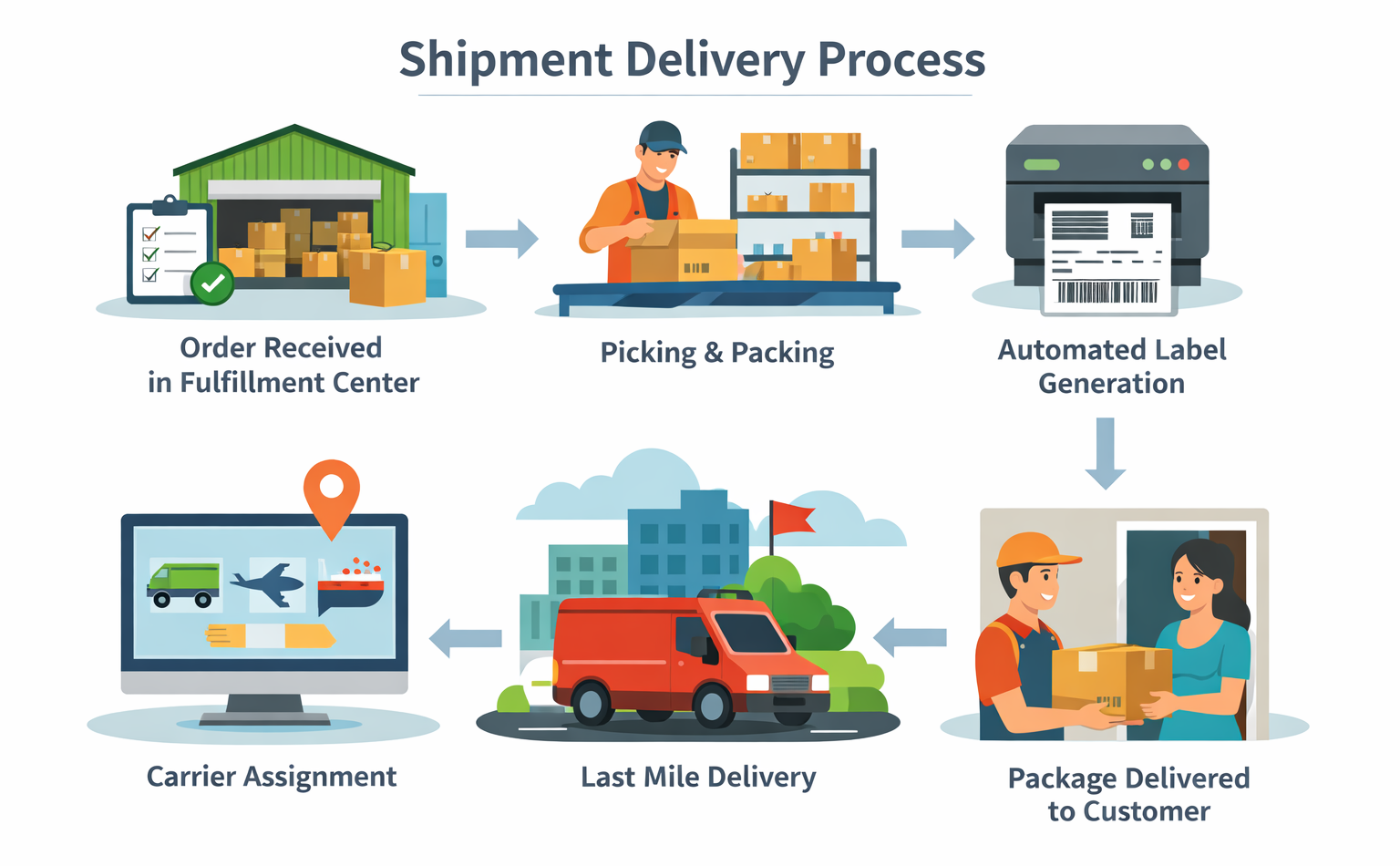
Shipping labels are not the same as mailing labels. A mailing label typically includes only a recipient’s name and address. A shipping label, by contrast, communicates operational instructions to automated sorting systems, linehaul networks, and last-mile carriers.
Each shipment requires a unique shipping label. At a minimum, a shipping label tells the delivery system:
- Where the package originated,
- Where it’s going,
- How it should be handled,
- Which service level applies,
- How it should be routed.
Without a clear, scannable label, packages risk delays, misroutes, or complete loss; outcomes that erode margins and customer confidence.
ℹ️ Certain shipments, such as perishables, temperature-sensitive goods, lithium batteries, or unboxed freight, require specialty labels designed for their handling conditions.
Key Components Every Shipping Label Needs To Include
While formats vary slightly by carrier, professional shipping labels follow standardized conventions so machines can process them at speed.
Every shipping label should include:
- Sender (return) address
- Recipient delivery address
- Service type (ground, priority, express, etc.)
- Tracking number and barcode
- Package weight and dimensions
- Carrier identifier and postage status
These elements allow warehouses, carriers, and automated sortation systems to interpret the shipment instantly.
How To Create A Shipping Label Step-By-Step
Buying shipping labels at a carrier counter means paying retail rates and wasting time. Even for low-volume shippers, that’s an inefficient route.
Creating shipping labels yourself unlocks discounted rates, faster processing, and scheduled pickups. There are two primary ways to do this: directly through carriers or through shipping software.
Option 1: Creating Shipping Labels Through Carrier Websites
Most major carriers allow you to generate labels directly through their websites. This approach works for occasional shipments but has clear limitations.
You can create labels through carrier websites like:
- USPS
- UPS
- FedEx
- DHL
- Amazon FBA and eBay shipping portals
This method typically involves manually entering shipment details, paying retail rates, and printing labels one at a time. It’s serviceable, but not scalable.
Option 2: Creating Shipping Labels Through Software Solutions
Shipping software platforms integrate directly with your eCommerce systems, warehouses, and carrier networks. They automate label creation, unlock commercial pricing, and reduce manual errors.
Depending on volume, platforms offer:
- Pay-as-you-go pricing for small sellers,
- Subscription or contract pricing for high-volume operations.
Beyond labels, these tools also provide dashboards for tracking, reporting, and exception management.
Recommended Workflow: Multi-Carrier Shipping Software
3PL partners like Agile streamline label creation into a simple, repeatable process. Multi-carrier shipping software embedded within a 3PL environment gives you instant access to multiple carriers, commercial rates, and service levels without manual comparisons or re-entry of data. Labels are created directly from order and inventory systems, reducing errors, accelerating processing, and maintaining consistency at scale.
The result is faster decision-making, lower shipping costs, fewer exceptions, and a shipping operation that moves with clarity and control instead of friction.
What Is A Return Shipping Label?
A return shipping label is a prepaid label provided by the retailer that allows a customer to send a product back without creating or paying for a label themselves. It’s often included inside the original shipment or delivered digitally. Return labels remove friction from the returns process, standardize reverse logistics flows, and help businesses maintain control, inventory visibility, and customer trust throughout the return journey.
How To Create Return Shipping Labels
Return shipping labels can be created at the same time as the outbound label or generated on demand when a return is initiated. Retailers may include a printed label in the original package, email a printable label, or send a QR code for printerless returns.
Shipping Label Format And Best Practices
Consistency and clarity are non-negotiable when it comes to shipping labels. Even minor deviations can cause scanning failures or delays.
How To Handle Special Shipments
If a shipment requires special handling, label it clearly:
- Fragile
- Perishable
- Flammable
- This Side Up
These cues help carriers route and handle packages appropriately.
How To Make Shipping Labels Visible
- Place labels on the largest, flattest surface.
- Avoid edges, seams, and corners.
- Ensure labels are fully visible and wrinkle-free.
- If protected with tape or sleeves, keep barcodes unobstructed.
How To Make Shipping Labels Scannable
- Never fold or crease barcode areas.
- Maintain white space around code.
- Use high-contrast black-on-white printing.
- Test scans before large batch runs.
Delivery Documentation
Insert a fulfillment summary inside the package or in an exterior pouch. It should list order data, product quantities, company contacts, and return instructions, supporting recovery if the label is compromised.
Shipping Label Example
While labels may differ slightly, most include the same core elements:
- Sender name and return address
- Recipient name and delivery address
- Package weight
- Machine-readable routing code
- Postal or regional barcode
- Service type
- Sorting or routing number
- Tracking number
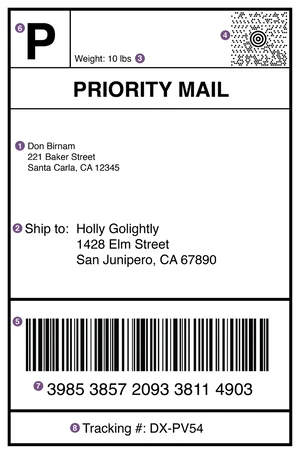
Understanding these elements helps teams troubleshoot issues quickly and communicate clearly with carriers.
How To Ship A Package Without A Label
Shipping without a label isn’t recommended. If necessary, create a digital label or QR code through a carrier or 3PL partner, have it printed at drop-off or pickup, and ensure shipment details are correctly linked before handoff.
Free vs Professional Shipment Labeling Solutions
Free shipping label tools and commercial platforms solve the same problem in very different ways. One prioritizes basic access, while the other delivers control, efficiency, and scalable performance.
Limitations of free label creation: Free label tools may work short-term, but they rely on retail pricing, manual processes, limited visibility, and lack the scalability required for confident, high-volume shipping operations.
Benefits of commercial shipping platforms: Commercial shipping platforms unlock discounted rates, multi-carrier flexibility, bulk label automation, tech integrations, and proactive tracking, giving operations clarity, control, and confidence as shipping volume grows.
How To Produce Shipping Labels In Volume
High-volume shipping requires systems built for scale, not manual workarounds. Bulk label generation keeps operations fast, accurate, and predictable, especially during peak demand.
Common approaches include:
- CSV Uploads – Upload structured data to generate hundreds of labels simultaneously, reducing repetitive data entry.
- System Integrations – Connect OMS, WMS, or eCommerce platforms to automatically create labels from live order data.
- Batch Processing – Process labels in grouped runs to minimize handling time, reduce errors, and maintain consistent tracking visibility.
Scale Your Shipping Game With Confidence
At high altitude, experienced climbers leave nothing to chance; they rely on systems they trust. The same discipline applies to shipping. When labels are accurate, standardized, and automated, operations move safely upward, even as volume increases.
With Agile eCom fulfillment workflows, you gain:
- Cost-effective shipping rates,
- Multi-carrier access and flexibility,
- Clean, professional label formats,
- Automated label creation and tracking,
- Seamless eCommerce and systems integration.
We stand with you.
With the right processes in place, your fulfillment operation becomes a steady ascent. Belay on. Because we’ve built systems to help you climb higher than ever before.
FAQs
How To Label A Box For Shipping?
Label a box for shipping by generating the label through a carrier or 3PL platform, selecting the service, printing the label, and then securely applying it to the package.
How To Fill Out A Shipping Label?
Complete sender and recipient addresses, select service type, enter accurate weight and dimensions, then generate and print the label through your carrier or shipping platform.
Where To Place A Shipping Label On A Box?
Place it on the largest, flattest surface of the package. Avoid edges, seams, and corners to keep barcodes scannable.
What Does A Shipping Label Look Like?
It includes addresses, service type, tracking number, barcodes, routing information, and carrier identification in a standardized layout.
How To Write A Shipping Label On A Box?
Use printed labels whenever possible. Handwritten labels increase error risk and reduce scan accuracy.
What Is The Standard Shipping Label Size?
The standard shipping label size for e-commerce orders is 4 × 6 inches (10 cm by 15 cm). This format is universally accepted by major carriers, optimized for barcode scanning, and compatible with thermal printers and most fulfillment workflows.
Do I Need Special Labels For Temperature-Controlled Shipments?
Yes. Perishable shipments with dry ice or gel packs require moisture-resistant labels that won’t smear or wrinkle.
Do Shipping Labels Expire?
If a label has a “ship by” date and it passes, the label may expire. Shipping after expiration can cause delays or rejection.
Can A Shipping Label Be Voided Before Shipment?
Yes. Before the first carrier scan, labels can be voided within our systems, triggering automatic refunds and inventory updates.
Where Exactly Should I Attach The Shipping Label To My Package?
Always use the most visible, flat surface. Never wrap labels around edges or corners.
Do I Have To Pay For A Shipping Label?
Creating a label is free, but postage must be paid before shipping. Commercial platforms help reduce that cost significantly.